
The Availability Problem Has Moved From Ops to Dev
For years, availability was an operations problem. Servers went down. Load balancers failed. DNS propagated slowly. Engineering teams built redundancy, failovers, and monitoring to keep production running. That discipline became second nature.
Now the same problem has migrated into development itself.
If your coding workflow depends on a cloud-hosted LLM, a provider outage is your outage. Not in production. On your machine. In your editor. While you are trying to ship.
What Provider Dependency Actually Looks Like
It starts small.
You use an AI assistant to scaffold a feature. Then to write tests. Then to debug. Then to refactor unfamiliar code. Each step is faster than doing it manually, so the habit deepens.
At some point, the assistant is not helping you code. It is doing the coding while you supervise. Some call this vibe coding. The term is casual. The dependency is not.
When the provider goes down, the impact is immediate:
- Features stall mid-implementation.
- Code you approved but did not fully understand becomes opaque.
- Deadlines slip because the assumed velocity was never yours — it was the model’s.
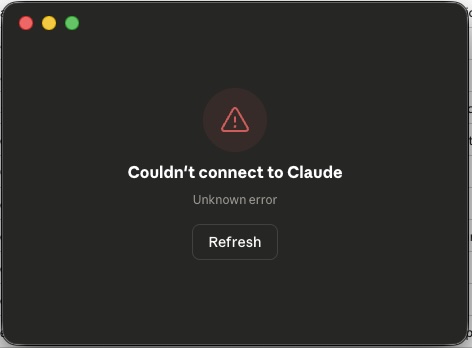 A familiar sight when provider availability fails you mid-workflow.
This is not a theoretical risk. Every major model provider has had outages in 2025 and 2026. Some lasted hours. For teams deep in AI-assisted sprints, hours matter.
The Deeper Problem: Understanding Erosion
Availability is the visible symptom. The underlying condition is worse.
When engineers offload too much reasoning to a model, they gradually lose contact with their own codebase. The architecture makes sense when the assistant explains it. The patterns feel right when the assistant generates them. But remove the assistant, and the mental model is thin.
This is not about skill level. Senior engineers with decades of experience can fall into this pattern. The tool is that effective. The comfort is that seductive.
The result is a new kind of fragility. Not in the system. In the team.
An engineer who cannot continue working without model access is not using a tool. That engineer is dependent on infrastructure — infrastructure owned and operated by someone else, with no SLA that matches a development deadline.
Switching Providers Does Not Solve It
The obvious response is provider diversification. If Claude is down, switch to GPT. If GPT is down, try Gemini.
This works on paper. In practice, it is expensive friction.
Every model has different strengths, context window behaviors, and failure modes. Prompts that produce clean output on one model may produce noise on another. Custom instructions, agent configurations, and workflow integrations are provider-specific.
Switching mid-task introduces context loss, inconsistency, and rework. It is the development equivalent of failing over to a cold standby database — technically possible, operationally painful.
Provider diversification is a mitigation, not a solution.
The Network Dependency Nobody Talks About
There is another dimension to this: every prompt, every code snippet, every file you send to a cloud model travels over the internet to someone else’s servers.
For many projects, this is fine. For others, it is a serious concern. Proprietary business logic. Unpublished algorithms. Security-sensitive infrastructure code. Internal API designs. All of it passes through an external network path to a third-party system.
Most teams do not think about this until compliance asks. By then, the habit is entrenched.
The availability problem and the data exposure problem share the same root cause: your development workflow depends on a network connection to a provider you do not control.
Local Models Are the Structural Fix
The long-term answer is emerging: local coding models that run directly on the developer’s machine.
Hardware is catching up. Apple Silicon ships with unified memory architectures capable of running quantized models with reasonable performance. High-VRAM GPUs are becoming accessible. Model quantization techniques have improved dramatically.
A capable coding model running locally eliminates two problems at once:
- Availability — No network dependency. No provider outage. The model runs whether your internet is up or not.
- Data sovereignty — Your code never leaves your machine. No third-party data processing. No compliance grey areas.
Local models are not yet at parity with the largest cloud models. Context windows are smaller. Reasoning depth is shallower for complex tasks. But for a large share of daily coding work — completions, refactoring, test generation, documentation — they are already sufficient.
The trajectory is clear. Local models will improve. The gap will narrow. Teams that start building local-first AI workflows now will have a structural advantage when the models cross the capability threshold.
What This Means for Your Workflow
You do not have to abandon cloud models. They remain the strongest option for complex reasoning tasks today.
But you should design your workflow so that a provider outage does not stop you. That means:
- Maintain your own understanding. Review AI-generated code critically. Understand what it does and why. If you cannot explain a module without the assistant, you do not own it yet.
- Keep manual competence sharp. Write code without the assistant regularly. Not as an exercise in nostalgia — as insurance.
- Evaluate local models now. Test them on your actual codebase. Know what works locally and what still needs a cloud model.
- Separate what requires a network from what does not. Sensitive code should default to local processing. Convenience does not override security.
- Treat AI access like any other dependency. Monitor it. Have a fallback. Do not assume 100% uptime.
The Pattern Repeats
Operations engineers learned this lesson over two decades. You do not trust a single provider for production uptime. You build redundancy. You plan for failure. You own your recovery path.
Development is now in the same position.
Your coding velocity depends on external infrastructure. If you do not plan for its absence, you are not engineering — you are hoping.
Build your AI workflow like you build your production systems. Expect failure. Design around it. Own your fallback.
Availability is not guaranteed. Competence must be.